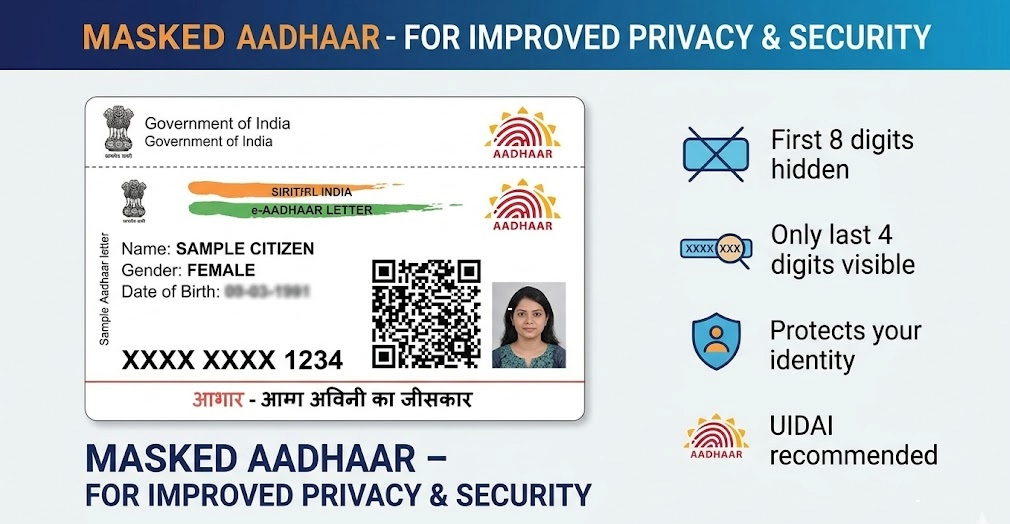
Masked Aadhaar is a safer version of your Aadhaar card that helps keep your personal information safe. It is given by the Unique Identification Authority of India (UIDAI) and is made to stop misuse of your Aadhaar number.
In a masked Aadhaar, the first eight numbers of your 12-digit Aadhaar number are hidden and shown as "XXXX-XXXX," while only the last four numbers are visible. This lets you use it as identity proof without showing your full Aadhaar number.
As online fraud cases are increasing, masked Aadhaar is becoming more important. It helps people protect their privacy while still allowing basic identity checks where full Aadhaar details are not needed.
Also Read | World’s busiest airport 2025: THIS US hub beats Dubai for top spot
Why Masked Aadhaar is important
Masked Aadhaar is very important for keeping your privacy safe. Your Aadhaar number is sensitive, and if it is shared or leaked, it can be used for fraud. By hiding most of the numbers, the masked Aadhaar helps reduce this risk.
It also follows government rules. Authorities have told organizations not to collect or store full Aadhaar numbers unless it is really needed. Masked Aadhaar is accepted by banks, hotels, and travel companies as ID proof. However, it cannot be used for e-KYC or Aadhaar verification, like opening a bank account or getting a new SIM card.
How to download a Masked Aadhar
You can easily download your masked Aadhaar from the official UIDAI website or the mAadhaar app. On the website, go to the UIDAI portal and click on “Download Aadhaar.” Then enter your Aadhaar number, VID, or EID. After that, fill in the captcha code, request an OTP, and verify it using your registered mobile number. Before downloading the PDF, make sure to select the option “Do you want a masked Aadhaar?”
You can also use the mAadhaar app for this process. First, log in, go to the download section, and choose the masked Aadhaar option. Then verify using OTP and download it easily.
After downloading, you can print it if needed. Even a black-and-white printout is valid. Always use official websites or apps only and avoid agents, as UIDAI does not charge any money for Aadhaar download.
Important things to remember
Your mobile number must be linked to your Aadhaar; otherwise, you will not receive the OTP needed for downloading it. If it is not linked, you will not be able to access the masked Aadhaar online.
You can also print your masked Aadhaar once it is downloaded. A black and white printout is completely valid, and even laminated copies are accepted for use as ID proof in many places.
Be careful about scams. The UIDAI never asks for money to download Aadhaar. Always use only the official website or app, and avoid any agents or fake services claiming to download Aadhaar for you.
Also Read | Your plans to visit China might take a massive dip as ‘logistical nightmare’ disrupts travel
Masked Aadhaar is a simple yet powerful way to protect your identity in today’s digital world. It allows you to share your ID safely without exposing sensitive information.
By using it wisely and downloading it from trusted sources, you can reduce the risk of fraud and keep your personal data secure.